# 插件更多页(s-more)
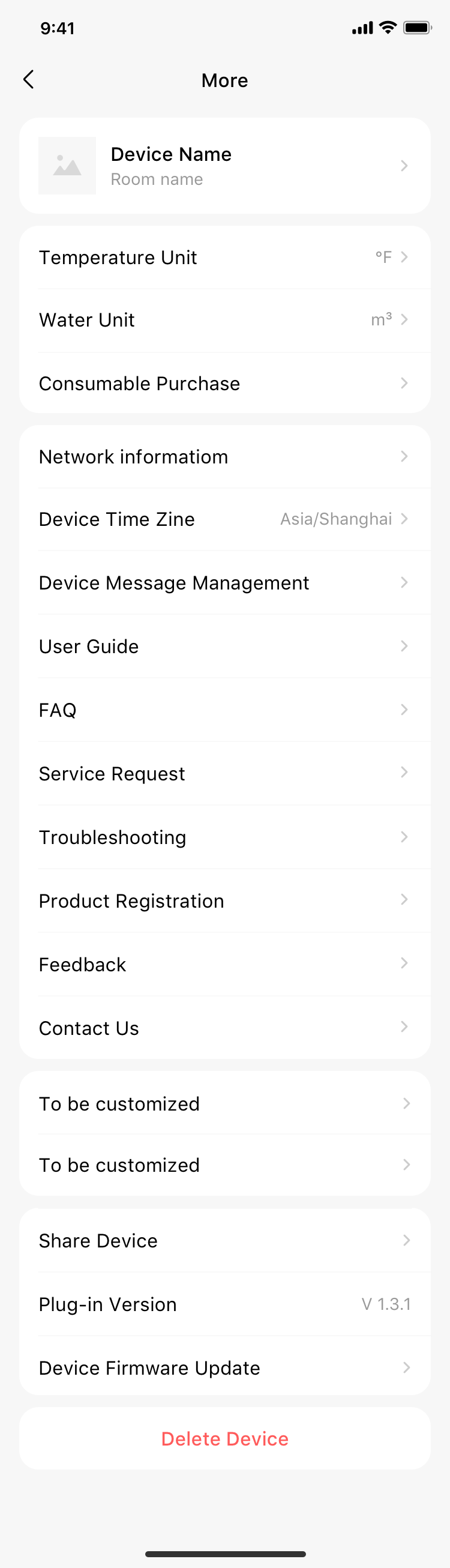
为了规范插件更多页,国际美居封装了超级插件更多页组件,供各事业部自行调用。该组件当前分为可选功能、默认功能、以及自定义内容块。 其中:默认功能中的电子说明书、常见问题(FAQ)需符合ibos配置才会自动展示功能入口,可选功能可根据事业部当前业务自行选择是否启用。
weex组件, 页面import导入。
# 实例
# 基础用法
<template>
  <s-more
    :languageType="lang"
    :notificiatonShow="true"
    :timeZoneShow="true"
    :serviceShow="true"
    :contactShow="true"
    :registerShow="true"
    :troubleshootingShow="true"
    :networkInfoShow="true"
    :plugVersion="'v1.3.1.3.22474939950'"
    :unitArr="unitArr"
    :deviceVoiceShow="true"
    :darkMode="true"
    :brandColor="'#000000'"
    @chooseUnit="chooseUnit"
    @customerOTAClick="customerOTAClick"
  >
    <template slot="custom">
      <!-- 自定义区域1,位于单位切换cell下,样式由插件控制 -->
      <div v-for="(item, index) in customCellList" :key="index">
        <div :class="['currency-box', reverseFlag && 'reverse']" @click="customClick(item)">
          <text :class="['title-text', reverseFlag && 'marginRight32']">{{ item.title }}</text>
          <image :class="['right-img', reverseFlag && 'right-img-reverse']" :src="arrowIcon"></image>
        </div>
        <div class="cardBorderStyle"></div>
      </div>
    </template>
    <template slot="custom2">
      <!-- 自定义区域2,位于ContectUs与分享设备之间,样式由插件控制 -->
      <div v-for="(item, index) in customCellList" :key="index">
        <div :class="['currency-box', reverseFlag && 'reverse']" @click="customClick(item)">
          <text :class="['title-text', reverseFlag && 'marginRight32']">{{ item.title }}</text>
          <image :class="['right-img', reverseFlag && 'right-img-reverse']" :src="arrowIcon"></image>
        </div>
        <div class="cardBorderStyle"></div>
      </div>
    </template>
    <template slot="custom3">
      <!-- 自定义区域3,位于设备信息页底部,样式由插件控制 -->
      <div v-for="(item, index) in customCellList" :key="index">
        <div :class="['currency-box', reverseFlag && 'reverse']" @click="customClick(item)">
          <text :class="['title-text', reverseFlag && 'marginRight32']">{{ item.title }}</text>
          <image :class="['right-img', reverseFlag && 'right-img-reverse']" :src="arrowIcon"></image>
        </div>
        <div class="cardBorderStyle"></div>
      </div>
    </template>
    <template slot="components">
      <!-- 自定义弹窗内容,如Modal、Popup,样式由插件控制 -->
      <dof-modal
        title="文本"
        :show="show"
        @dofModalCancelBtnClicked="show = false"
        @dofModalConfirmBtnClicked="show = false"
        :single="false"
      ></dof-modal>
      <dof-popup :show="show2" @dofPopupOverlayClicked="show2 = false" pos="bottom" :height="400"></dof-popup>
    </template>
  </s-more>
</template>
<script>
// 引入组件库
import { SMore } from 'smarthome-weex-components';
import { DofModal, DofPopup } from 'dolphin-weex-ui';

export default {
    components: {
        SMore,
        DofModal,
        DofPopup
    },
    data() {
        return {
            lang: '',
            customCellList: [
                {
                title: '周定时'
                },
                {
                title: '滤网复位'
                }
            ],
            arrowIcon: 'data:image/png;base64,iVBORw0KGgoAAAANSUhEUgAAADAAAAAwBAMAAAClLOS0AAAAJ1BMVEUAAADS0tLIyM3IyM3j4+Pe3t7IyM3IyM3IyMzIyM3IyMzJyczHx8yqMS2VAAAADHRSTlMABbC8CQe254eA3Y0UyxObAAAAfklEQVQ4y2MYBICxvUIAqwTHmTOpWCXYz5w5FoBdAqoF0ygcWhhzcGkJw6WFlUwtpti0iAElDmN1mA5QxgSbFiGQFgeaa8HrsA24tBRgk3DGIcFiA5SYgEPDIQEcGhRHmAZWXBq4cWhgYIdqwJTAoYGBE4cGBsZZKwUYBg8AANHecMnOzL6KAAAAAElFTkSuQmCC',
            show: false,
            show2: false,
            unitArr: [
              /**
               * 数组元素定义
               * unitId:单位id,必填,用于区分多组单位
               * unitName:单位名称,必填,须由事业部处理多语言
               * unitIndex:单位索引值,必填,当前所选单位的索引值,从0开始
               * unitList:单位列表,必填,数组类型,每个元素为一个字符串,表示一个单位,须由事业部处理多语言
               */
              {
                unitId: '1',
                unitName: '单位1',
                unitIndex: 0,
                unitList: ['℃', '℉']
              }
            ],
        }
    },
    computed: {
        reverseFlag() {
            if (this.lang === 'ar' || this.lang === 'he') {
                return true
            }
            return false
        }
    },
    methods: {
        customClick(item) {
            // nativeService.alert(item.title)
            if (item.title === '周定时') {
              this.show = true;
            } else {
              this.show2 = true;
            }
        },
        customerOTAClick() {
          // 绑定该事件后可进行自定义操作。未绑定该事件则默认跳转固件升级页
          nativeService.toast('已绑定customerOTAClick事件,执行插件自定义操作')
        },
        chooseUnit({ unitId, chooseIndex }) {
          const modifyIndex = this.unitArr.findIndex(item => item.unitId === unitId);
          if (modifyIndex > -1) {
            this.$set(this.unitArr[modifyIndex], 'unitIndex', chooseIndex);
          }
        }
    },
    created() {
        nativeService.getLanguage().then((res) => {
            this.lang = res.language || 'en';
        });
    },
    mounted() {
    }
};
</script>
<style scoped>
.wrap {
  background-color: #f7f7f7;
}
.title-text {
  margin-left: 32px;
  font-size: 32px;
  color: #000000;
}
.marginRight32 {
  margin-right: 32px;
}
.currency-box {
  display: flex;
  flex-direction: row;
  justify-content: space-between;
  align-items: center;
  height: 104px;
}
.reverse {
  flex-direction: row-reverse;
}
.cardBorderStyle {
  width: 622px;
  margin-left: 32px;
  height: 1px;
  background: #f2f2f2;
}
.right-img {
  width: 24px;
  height: 24px;
  margin-right: 32px;
}
.right-img-reverse {
  transform: rotateY(540deg);
  margin-right: 0;
  margin-left: 32px;
}
</style>
# 功能描述
| 功能名称 | 功能说明 |
|---|---|
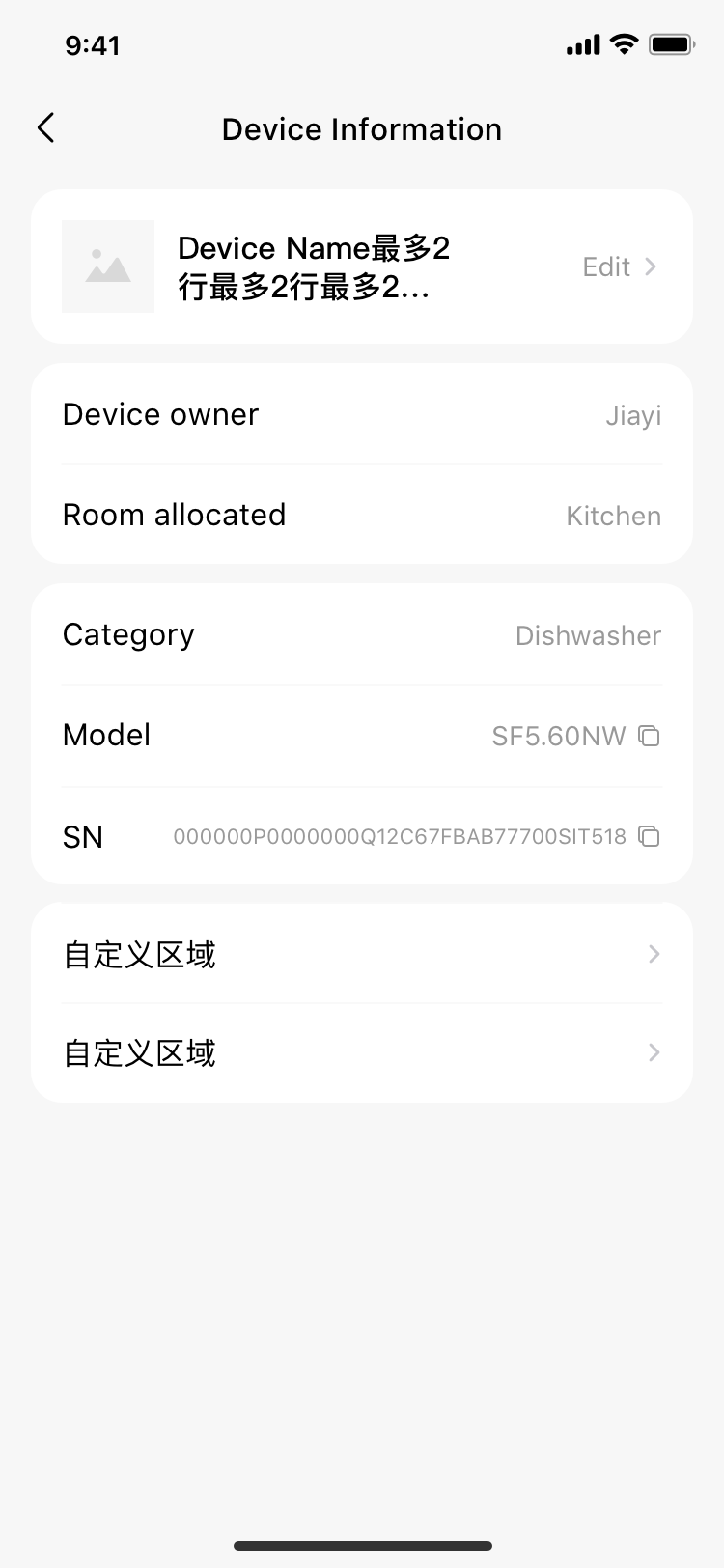
| 设备信息 | 设备信息展示(设备图片、设备名称、设备品类、设备型号、设备sn;主人设备可编辑/修改设备名称;点击可复制设备型号、设备SN到剪切板) |
| 单位切换 | 由插件通过unitArr输入可选单位切换,样式由组件控制,具体切换逻辑由组件在chooseUnit回调中自行处理 |
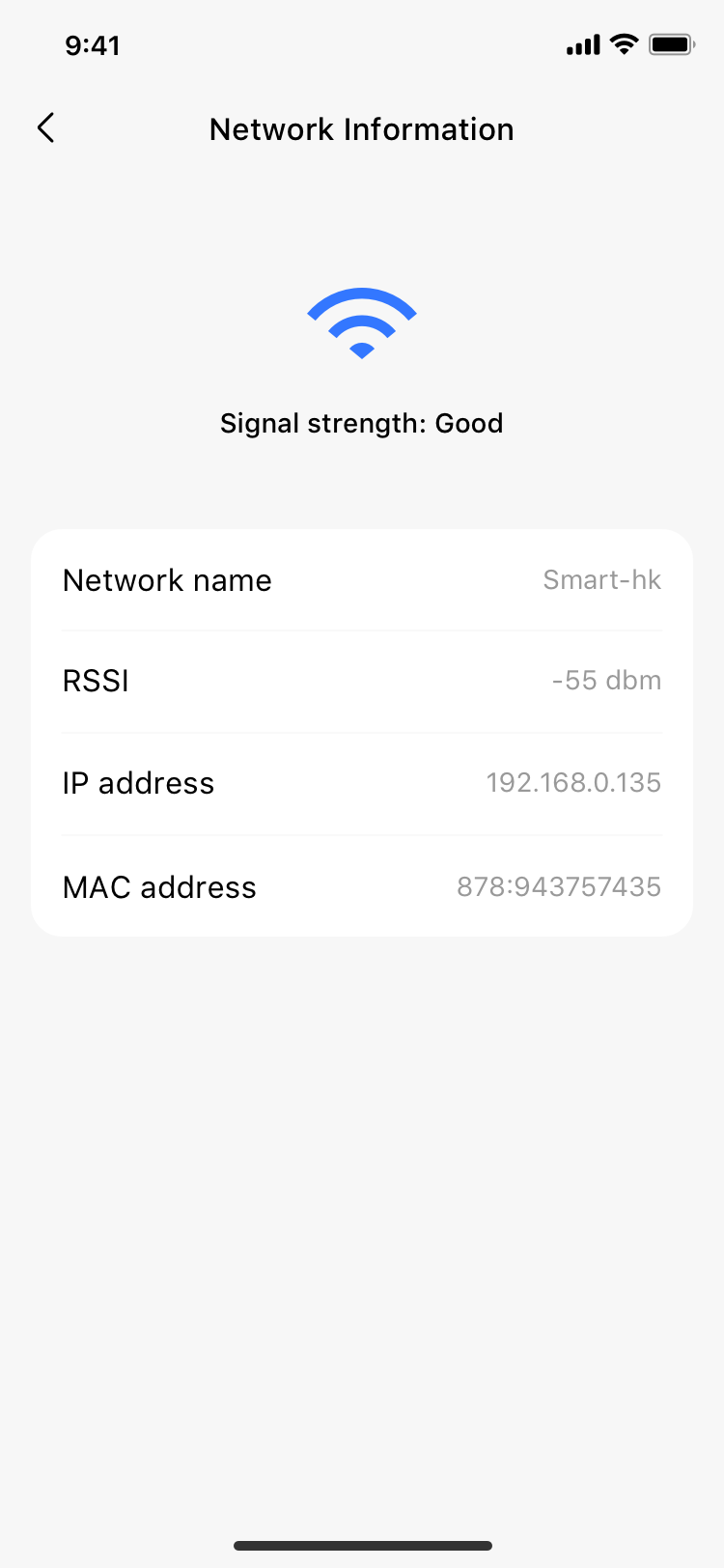
| 网络信息 | 设备连接WiFi网络后网络信息展示,仅设备在线且模组支持时展示入口 |
| 设备时区 | 显示设备当前所在时区,支持修改,默认配网时所在时区,纯蓝牙直连设备不展示该入口 |
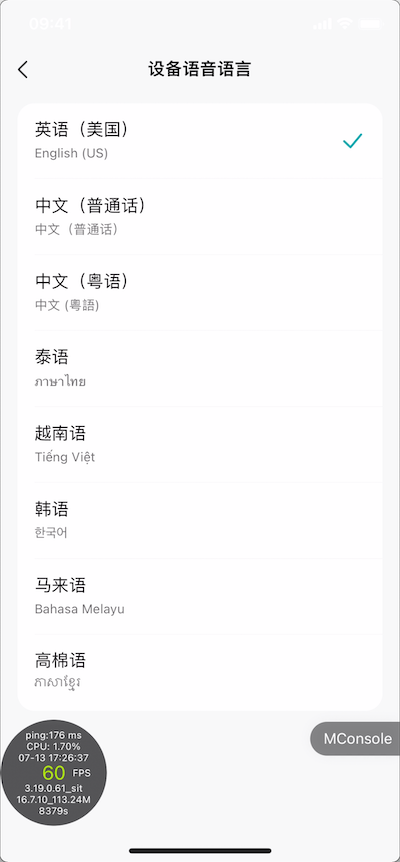
| 设备语音 | 显示设备当前语音设置,支持修改,由事业部插件控制入口显示,列表需根据品类+sn8配置 |
| 设备消息管理 | 可跳转设备消息开关管理页,默认存在一个总开关,其余子开关由事业部配置 |
| 电子说明书 | 根据ibos接口配置判断是否展示入口 |
| 常见问题 | 根据ibos接口配置判断是否展示入口 |
| 一键报修 | 针对已开放国家展示入口 |
| 智能诊断 | 根据ibos接口配置判断是否展示入口 |
| 产品注册 | 针对已开放国家展示入口 |
| 问题反馈 | 跳转App的设备FAQ进行问题反馈 |
| 售后电话 | 根据ibos接口配置判断是否展示入口 |
| 设备分享 | 仅主人且非蓝牙直连设备展示分享入口和操作设备分享 |
| 插件版本号 | 由事业部传参 |
| 固件升级 | 设备OTA,有待升级设备展示红点(蓝牙直连设备不展示入口),支持自定义固件升级事件 |
| 删除设备 | 云端删除设备接口,删除设备成功后回到APP首页 |
| 多语言 | 依赖事业部传入插件当前语言码,若未能匹配事业部传入的语言码,则以英文兜底。注:自定义功能翻译需事业部自行处理 |
| 家庭信息 | 美居v3.8、东芝v2.5后,支持家庭信息展示,主人设备显示家庭名称&房间名称(如有分配);分享设备显示设备所属家庭名称 |
# Attributes
| Prop | Type | Required | Optional values(可选值) | Default | Description |
|---|---|---|---|---|---|
| languageType | String | Yes | SmartHome/TSmartLife当前支持的所有语言码 | en | 语言码(根据国际美居/国际东芝语言码传入),超出当前app范围内的语言或不传语言码,则以英文兜底 |
| plugVersion | String | Yes | - | - | 插件版本号 |
Boolean | |||||
Number | |||||
| networkInfoShow | Boolean | No | true/false | true | 网络信息 |
| timeZoneShow | Boolean | No | true/false | false | 设备时区(蓝牙直连设备不展示入口) |
| deviceVoiceShow | Boolean | No | true/false | false | 设备语音 |
| notificiatonShow | Boolean | No | true/false | false | 设备消息管理 |
| serviceShow | Boolean | No | true/false | false | 一键报修 |
| registerShow | Boolean | No | true/false | false | 产品注册 |
| contactShow | Boolean | No | true/false | false | 联系我们,默认仅查询、展示当前设备品牌相关的售后电话 |
| contactShowAllBrand | Boolean | No | true/false | false | 联系我们是否展示所有品牌的售后电话(已配置在后台的售后电话),^0.5.12 |
| troubleshootingShow | Boolean | No | true/false | false | 智能诊断 |
| showOTARedDotCus | Boolean | No | true/false | false | 自定义固件升级是否显示小红点,仅在传入customerOTAClick时生效 |
| unitArr | Array | No | - | [] | 自定义单位设置 |
| applianceCode | String | No | - | '' | 自定义设备id,查询指定设备,兼容Android组合容器中子设备无法直接获取子设备信息 |
| targetStep | Number | No | 1/2/3/4 | 1 | 自定义跳转子页面,1:s-more首页;2:设备信息页;3:网络信息页;4:语音列表页(跳转该页需同时设置deviceVoiceShow为true);设置该参数后,返回按钮将直接返回上一级页面 |
| darkMode | Boolean | No | true/false | false | 是否暗黑 |
| brandColor | String | No | 十六进制/RGBA色值 | '' | 自定义品牌色 |
# Slots
| name | Type | 说明 |
|---|---|---|
| custom | - | 自定义功能区-位于温度单位切换下方 |
| custom2 | - | 自定义功能区-位于ContactUs与分享设备之间 |
| custom3 | - | 自定义功能区-位于设备信息二级页面底部,v0.5.10版本支持 |
| components | - | 自定义弹窗组件等放置区域 |
# Events
| 事件名称 | 说明 | 回调参数 |
|---|---|---|
| customerOTAClick | 针对“固件升级”支持可选绑定事件,绑定该事件后可进行自定义操作。未绑定该事件则默认跳转固件升级页 | - |
| chooseUnit | 切换单位事件回调 | { unitId, chooseIndex };unitId:对应unitArr中的unitId;chooseIndex:用户选中的单位下标 |
# BroadcastChannel
通过广播频道,抛出用户点击事件,供事业部执行自定义行为,如:埋点等;主要判断/跳转逻辑依然由组件内完成
const sMoreBroadcastChannel = new BroadcastChannel('sMoreBroadcastChannel')
sMoreBroadcastChannel.onmessage = event => {
  this.$bridge.log('sMoreBroadcastChannel', event.data);
// event.data结构
// {
//   messageEvent: 'sMoreBroadcastChannel',
//   messageContent: {
//     clickEvent: 'deviceDetail'
//   }
// }
};
| clickEvent | 说明 |
|---|---|
| deviceDetail | 点击设备信息 |
| notifiSetting | 点击消息开关设置 |
| deviceTimeZone | 点击设备时区 |
| userGuide | 点击电子说明书 |
| FAQ | 点击常见问题 |
| Troubleshooting | 点击智能诊断 |
| serviceRequest | 点击一键报修 |
| Register | 点击产品注册 |
| contactUs | 点击联系我们 |
| Feedback | 点击问题反馈 |
| shareDevice | 点击设备分享 |
| deviceOTA | 点击固件升级 |
| editDeviceName | 编辑设备名称-二级页面 |
| copySN | 复制设备SN-二级页面 |
| copySerialNo | 复制设备SerialNo-二级页面 |
| copyModel | 复制设备型号-二级页面 |
| networkDetail | 点击网络信号强度-跳转网络信号页-二级页面 |
| pluginVersion | 插件版本信息-无后续动作 |
| homeName | 家庭名称-无后续动作 |
| roomName | 房间名称-无后续动作 |
| categoryName | 品类名称-无后续动作 |
| routerName | 路由名称-无后续动作 |
| routerSignal | 路由信号强度-无后续动作 |
| deviceVoice | 设备语音语种设置-跳转语音语种设置页-二级页面 |
| updateVoice | 更新设备语音语种设置-调用云端接口更新设备语音语种成功 |