
# 7.12 加载中(Loading)
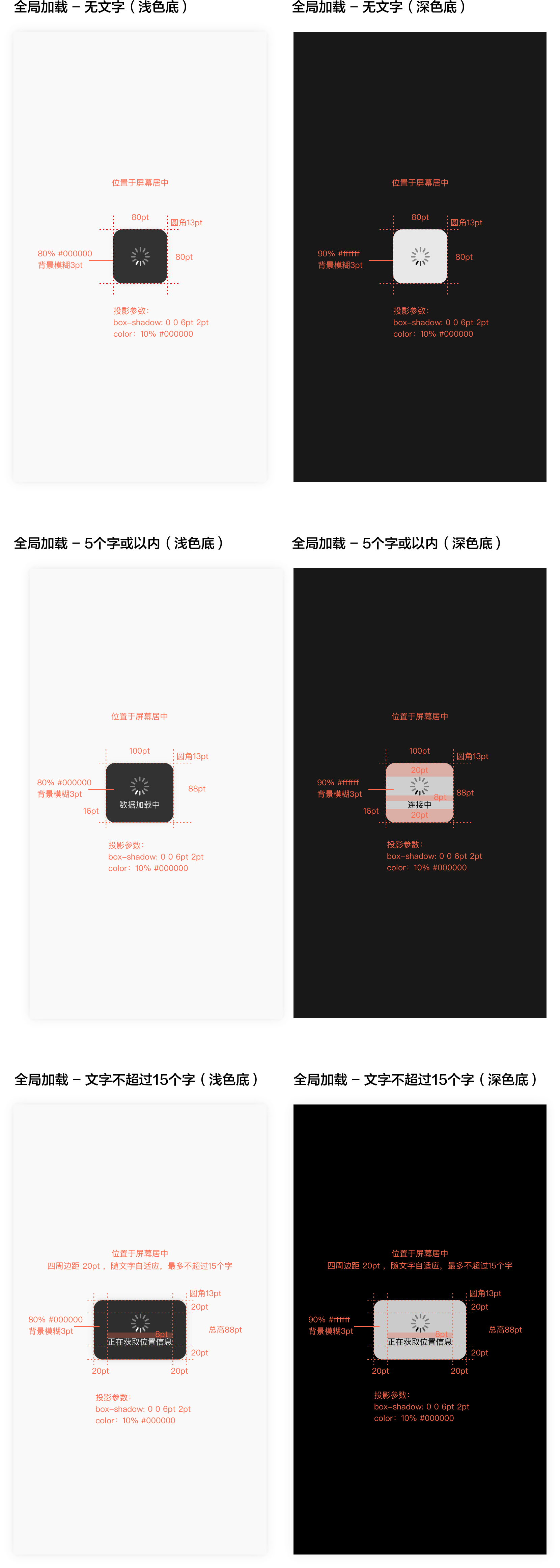
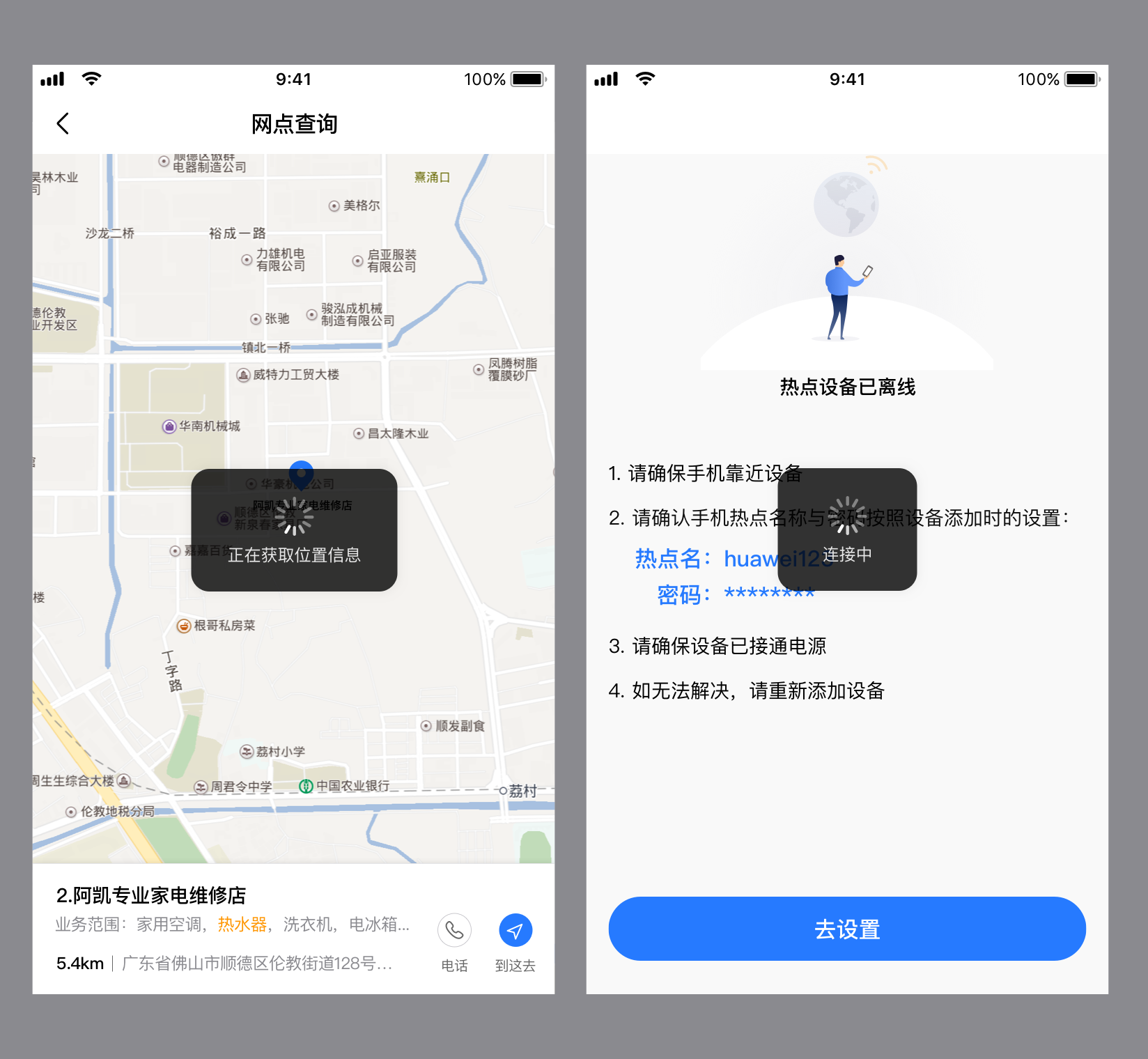
用于页面的加载中状态。
# 样式
# 应用示例
# dof-loading
图片列表全屏显示组件
- 让用户知道页面正在加载,减少用户焦虑感
- 在某些特定场景下,提供有意义的文案,帮助用户明白哪个任务正在进行中
# 实例
# 使用方法
<template>
  <div class="dof-demo">
    <dof-minibar
      title="loading"
      background-color="#267AFF"
      text-color="#ffffff"
      :left-button="leftButton"
      @dofMinibarLeftButtonClicked="back"
      right-text="more"
    ></dof-minibar>
    <scroller class="scroller">
      <title title="dof-loading"></title>
      <category title="使用案例"></category>
      <div class="container">
        <dof-button class="loadingBtn"
                    type="primary"
                    text="全局加载-无文字(浅色底)"
                    @dofButtonClicked="openLoading('black')">
        </dof-button>
        <dof-button class="loadingBtn"
                    type="primary"
                    text="全局加载-无文字(深色底)"
                    @dofButtonClicked="openLoading('white')">
        </dof-button>

        <dof-button class="loadingBtn"
                    type="primary"
                    text="全局加载 - 5个字或以内(浅色底)"
                    @dofButtonClicked="openTextLoading('black','数据加载中')">
        </dof-button>
        <dof-button class="loadingBtn"
                    type="primary"
                    text="全局加载 - 5个字或以内(深色底)"
                    @dofButtonClicked="openTextLoading('white', '连接中')">
        </dof-button>
        <dof-button class="loadingBtn"
                    type="primary"
                    text="全局加载 - 文字不超过15个字(浅色底)"
                    @dofButtonClicked="openMoreTextLoading('black','数据加载中数据加载中数据加载中')">
        </dof-button>
        <dof-button class="loadingBtn"
                    type="primary"
                    text="全局加载 - 文字不超过15个字(深色底)"
                    @dofButtonClicked="openMoreTextLoading('white', '连接中连接中连接中')">
        </dof-button>
      </div>
    </scroller>
    <dof-loading :show="isShow"
                 :type="type"
                 ></dof-loading>

    <dof-loading :show="textShow"
                 :type="type"
                 :loading-text="loadingText"
                 ></dof-loading>

    <dof-loading :show="moreTextShow"
                 :type="type"
                 :loading-text="loadingText"
                 ></dof-loading>
  </div>
</template>
<script>
  import {  DofLoading, DofMinibar, DofButton } from 'dolphin-intl-ui';

  export default {
    components: { DofLoading, DofMinibar,DofButton },
    data () {
      return {
        leftButton: 'http://dolphin-weex-dev.msmartlife.cn/cdn/images/header/back_white@3x.png',
        isShow: false,
        interval: 300,
        type: 'default',
        loadingText: '',
        textShow:false,
        moreTextShow:false,  // 文字不超过15个字
      };
    },
    created () {
      setTitle('Loading');
    },
    methods: {
      openLoading (color) {
        if (color == 'black') {
          this.type = "default"
        }else{
          this.type = "white"
        }
        this.isShow = !this.isShow
      },

      openTextLoading (color, text) {
        this.loadingText = text
        if (color == 'black') {
          this.type = "default"
        }else{
          this.type = "white"
        }
        this.textShow = !this.textShow
      },

      openMoreTextLoading(color, text) {
        this.loadingText = text
        if (color == 'black') {
          this.type = "default"
        }else{
          this.type = "white"
        }
        this.moreTextShow = !this.moreTextShow
      }
    }
  };
</script>
1
2
3
4
5
6
7
8
9
10
11
12
13
14
15
16
17
18
19
20
21
22
23
24
25
26
27
28
29
30
31
32
33
34
35
36
37
38
39
40
41
42
43
44
45
46
47
48
49
50
51
52
53
54
55
56
57
58
59
60
61
62
63
64
65
66
67
68
69
70
71
72
73
74
75
76
77
78
79
80
81
82
83
84
85
86
87
88
89
90
91
92
93
94
95
96
97
98
99
100
101
102
103
104
105
106
107
108
109
110
111
112
113
2
3
4
5
6
7
8
9
10
11
12
13
14
15
16
17
18
19
20
21
22
23
24
25
26
27
28
29
30
31
32
33
34
35
36
37
38
39
40
41
42
43
44
45
46
47
48
49
50
51
52
53
54
55
56
57
58
59
60
61
62
63
64
65
66
67
68
69
70
71
72
73
74
75
76
77
78
79
80
81
82
83
84
85
86
87
88
89
90
91
92
93
94
95
96
97
98
99
100
101
102
103
104
105
106
107
108
109
110
111
112
113
# Attributes
| Prop | Type | Required | Default | Description |
|---|---|---|---|---|
| show | Boolean | N | false | loading是否显示 |
| type | String | N | default | loading类别default/white |
| loading-text | String | N | "" | 配置文案文本内容 |
| interval | Number / String | N | 0 | 延迟毫秒数显示,用于体验优化,默认为0,无延迟 |
need-mask | Boolean | N | true | 是否需要遮罩层 |
mask-style | Object | N | {} | 遮罩层自定义样式 |
need-dark-mode | Boolean | N | false | 是否启用 M-dark/T-dark 内置暗黑适配 |
background-color | String | N | '' | 背景色 |
text-color | String | N | '' | 文字颜色 |
设置 :need-dark-mode="true" 可启用内置暗黑配色,主题初始化与构建配置见 接入说明。
颜色属性为空时使用内置配色;业务显式颜色和样式覆盖优先于默认配色,关闭暗黑适配后仍有效。
# Events
| 事件名 | 说明 | 回调参数 |
|---|---|---|
dofLoadingMaskClicked | need-mask 为 true 时点击遮罩触发 | {} |