
# 5.2 列表项2(Cell2)
基础的列表展示可承载文字、图标、段落,常用于界面中内容展示页面。
# 列表高度
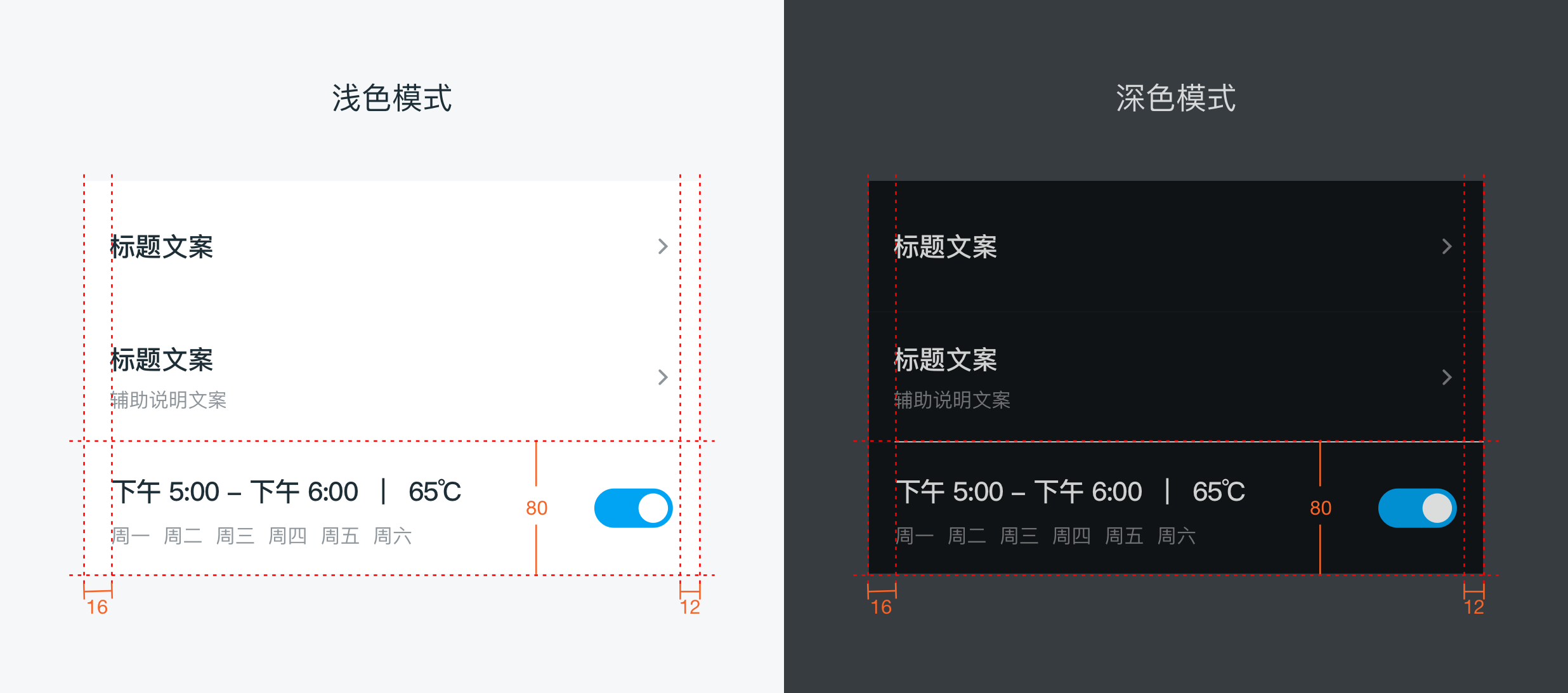
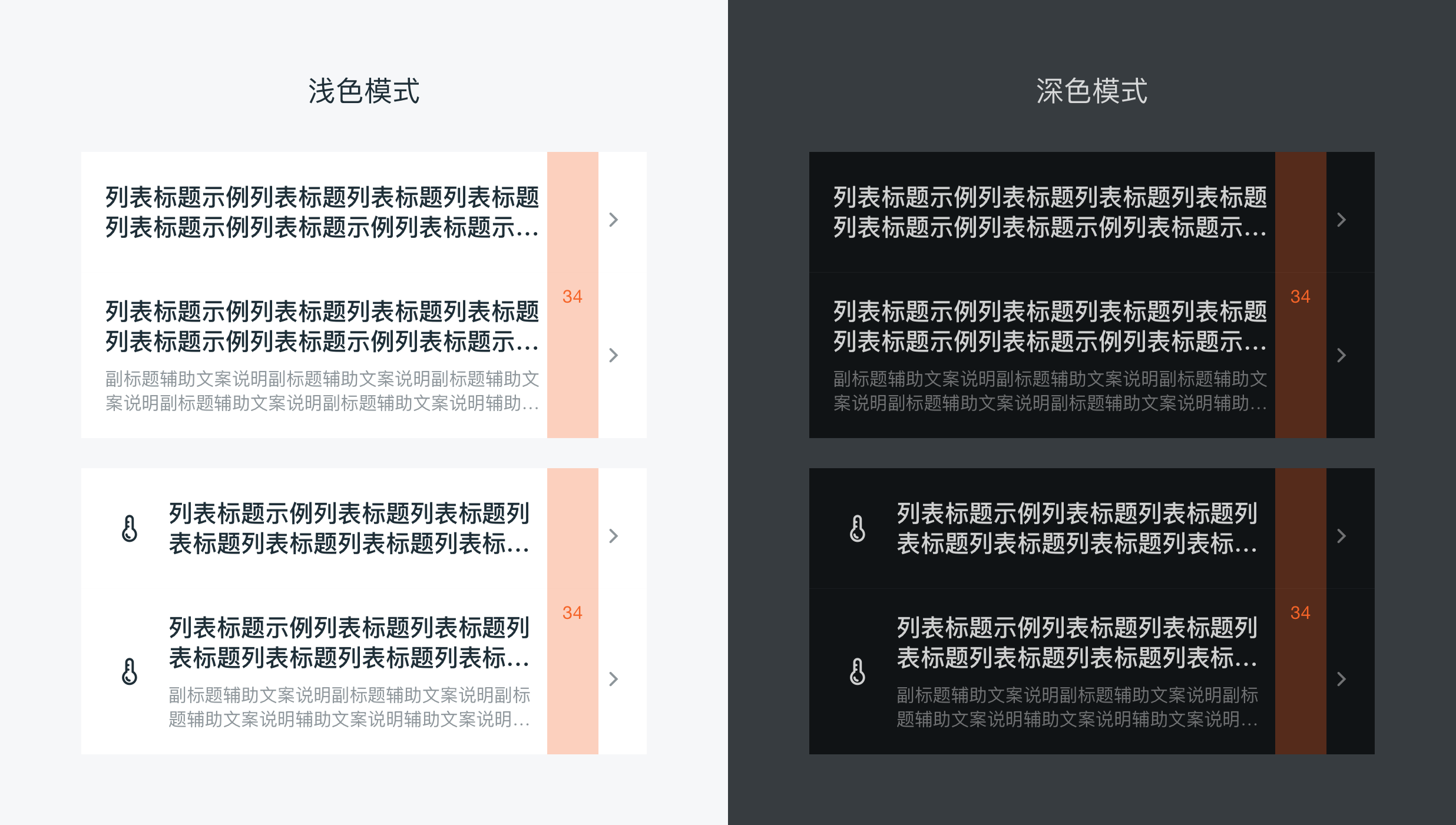
列表高度目前主要分为 52pt、80pt 两种大小,摘要字段一般需要控制在一行以内,但当业务需求有特殊情况描述文本需要转行时,高度可适当增加至 92pt;设计师在设计时需根据不同情况选用相应的样式。
# 列表中分隔线
分割线粗细均为:0.5pt颜色:#F2F2F2
样式分为下图中两种:(分割线详细规则见分割线单独说明)
· 普通界面设置左边留 16pt,右边置顶;
· 插件页卡片中的分割线为左边对齐文字,右边距离卡片 16pt。
# 列表中背景
APP背景色彩全局均采用 #F9F9F9 色值
# 按下效果
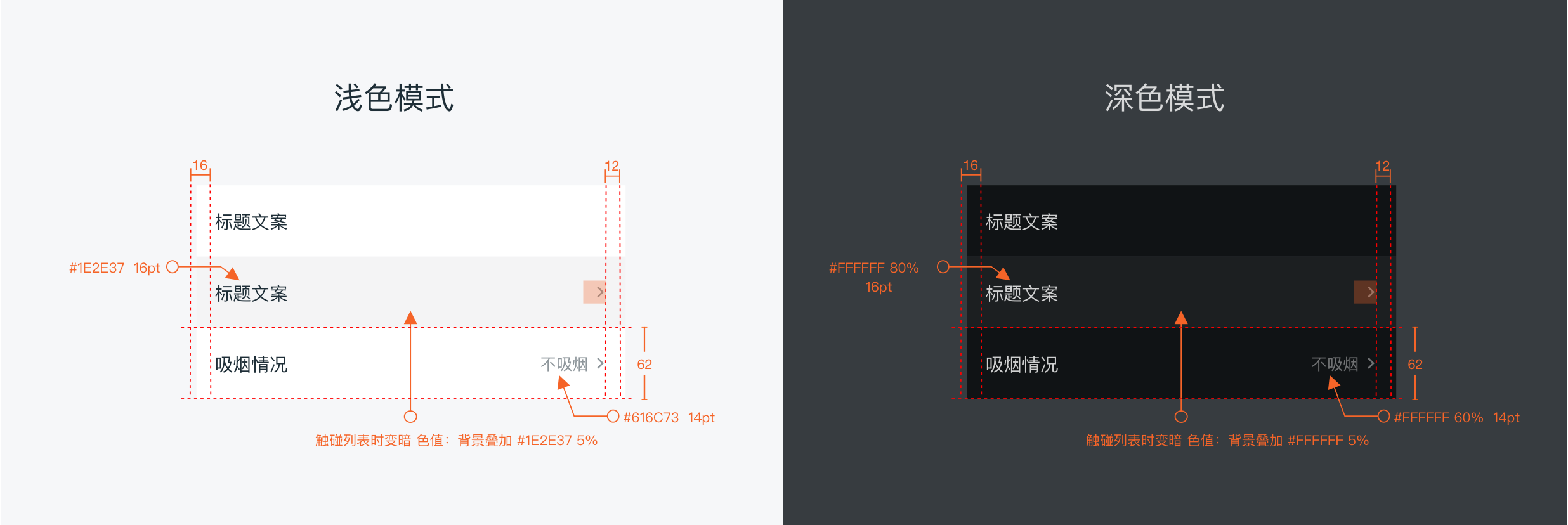
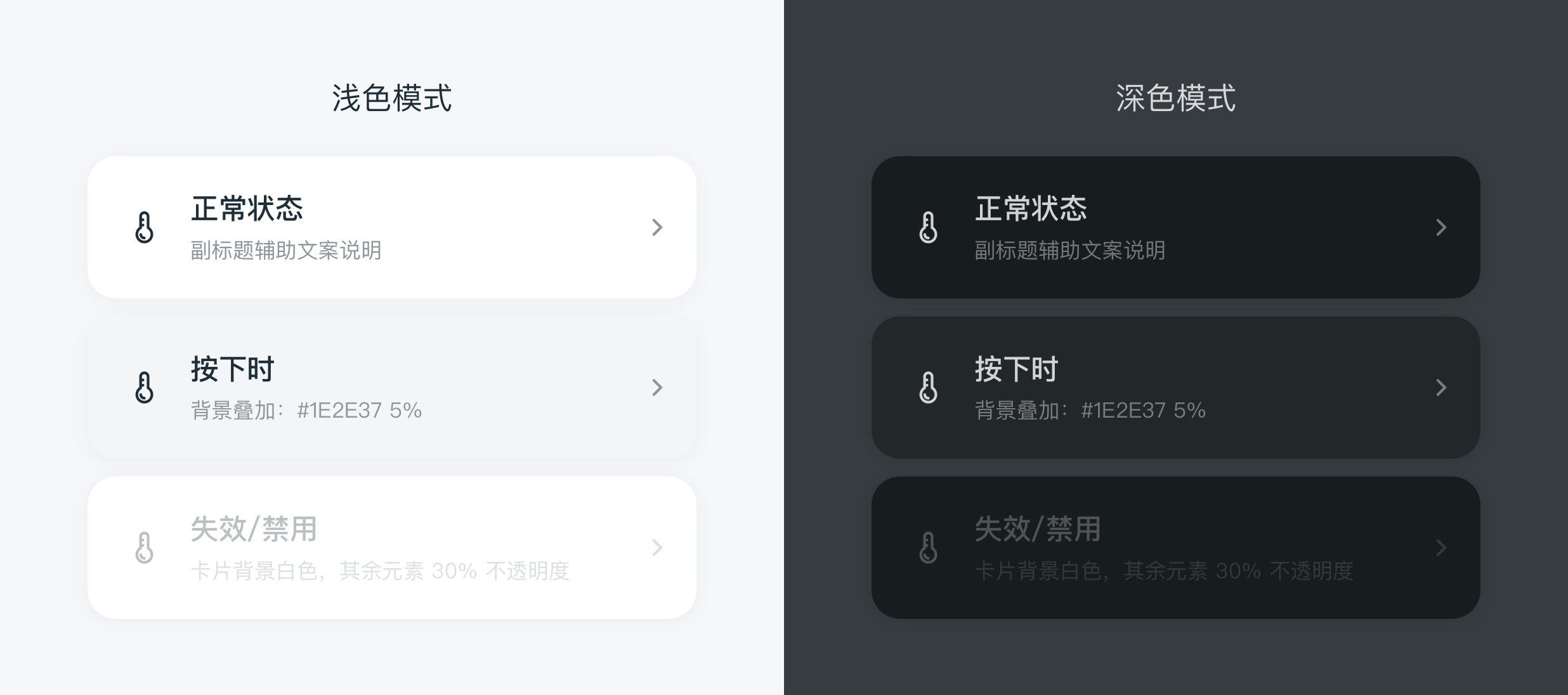
按下或触碰时,色值:#F5F5F5
# 文字样式
文字长度:主副标题文字最长距离右边文字 40pt,超过用"…"代替
# 主标题
16pt #000000
# 副标题
12pt #8A8A8F
# 右边选项说明文字
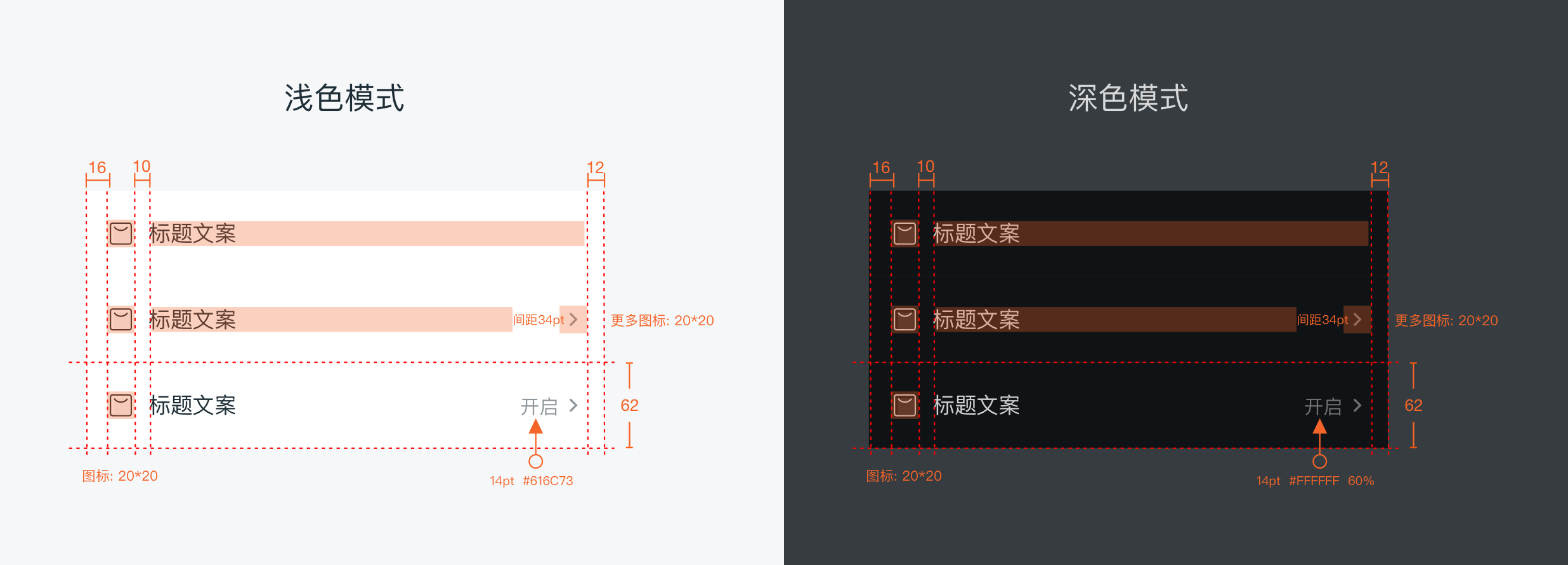
· 全局统一:14pt #666666 (多用于二级表单页面)
· 插件页首页:16pt #666666 (用于出现在插件页首页,又为重要信息的)
· 文字较多时特殊处理: 12pt #8A8A8F (整页面统一处理,出现较少)
# 窄列表(行高 52pt)
# 无图标
用于较多功能列表时,多用于"更多""设置"等页面内
# 有图标
用于较多功能列表时,且需要图标辅助说明
# 宽列表(行高 80pt)
# 无图标
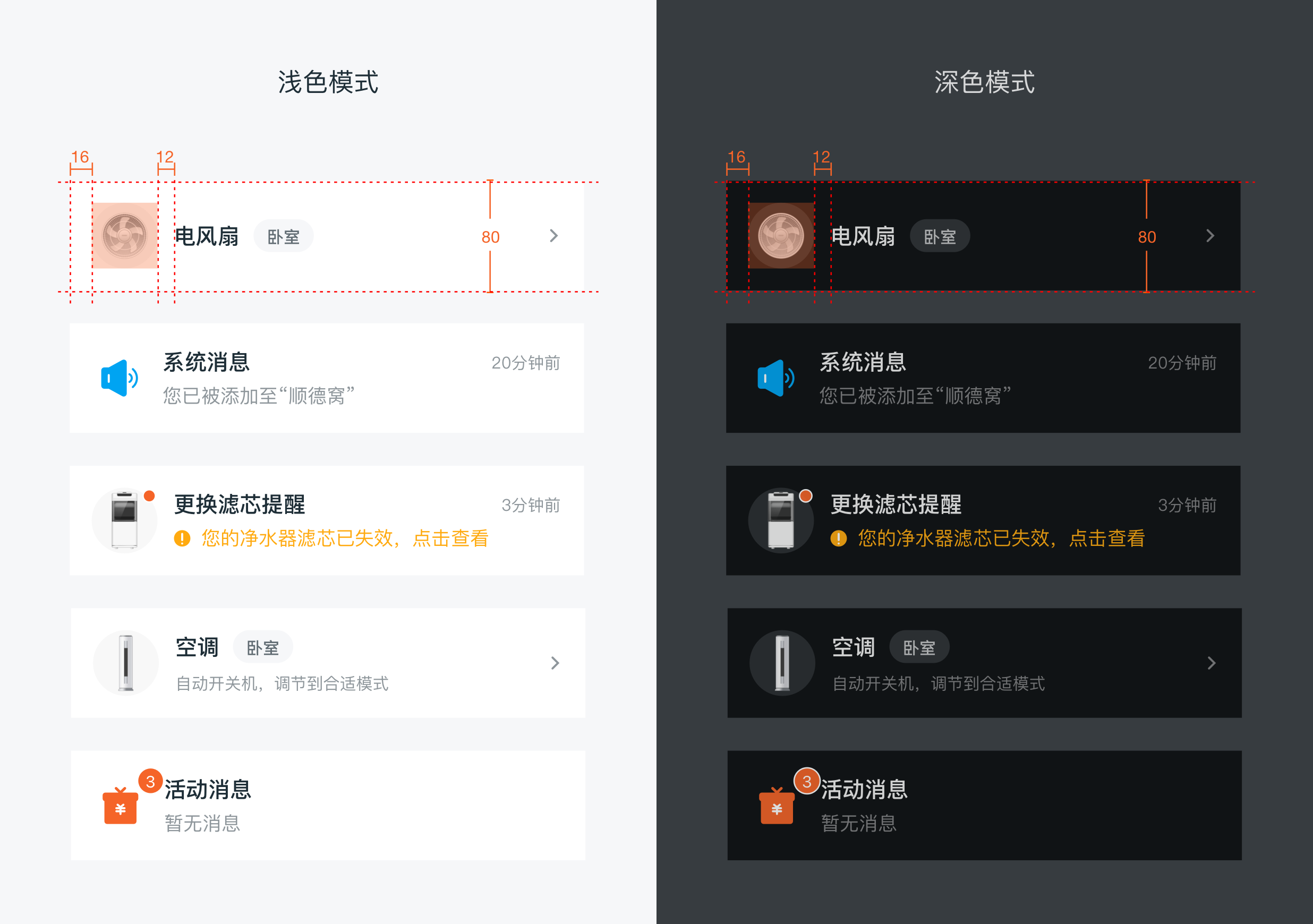
常见用于预约界面等;两行文字之间间距为:12pt
# 有图标
图标大小:28pt * 28pt
用于美居场景内,辅助说明小图标
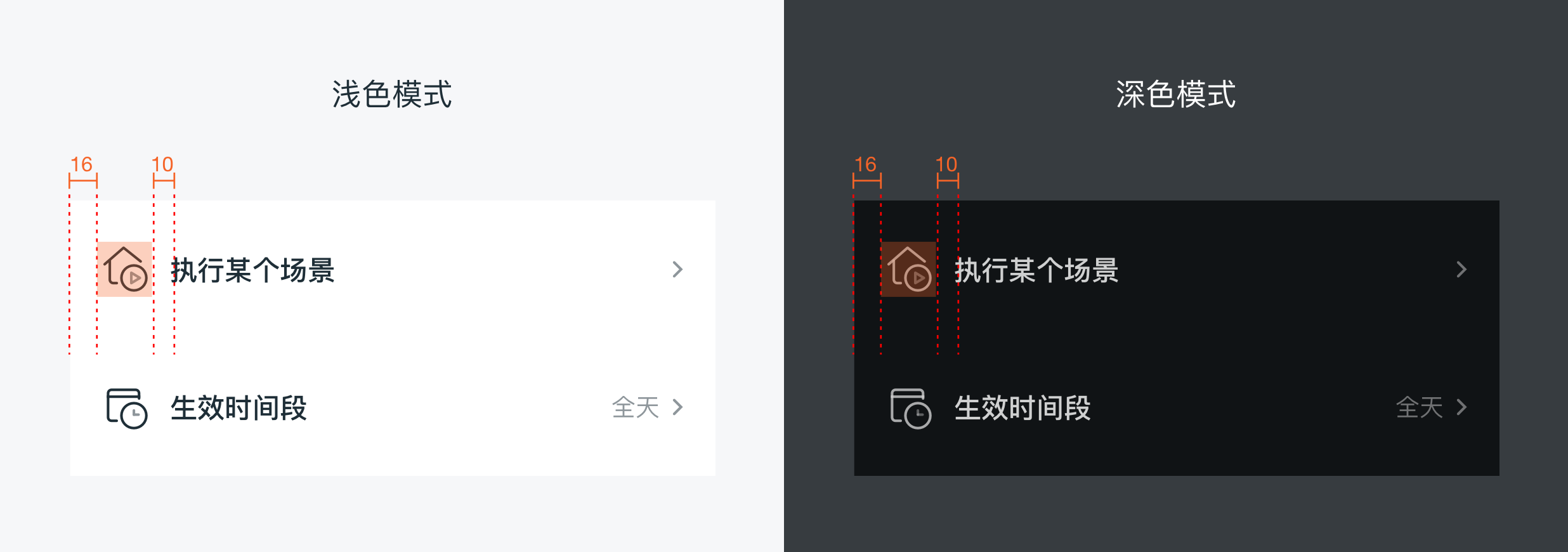 图标大小:48pt * 48pt
用于需要大图标强调时;两行文字之间间距为:12pt
# 特殊型(行高 92pt)
副标题有 2 行文字时
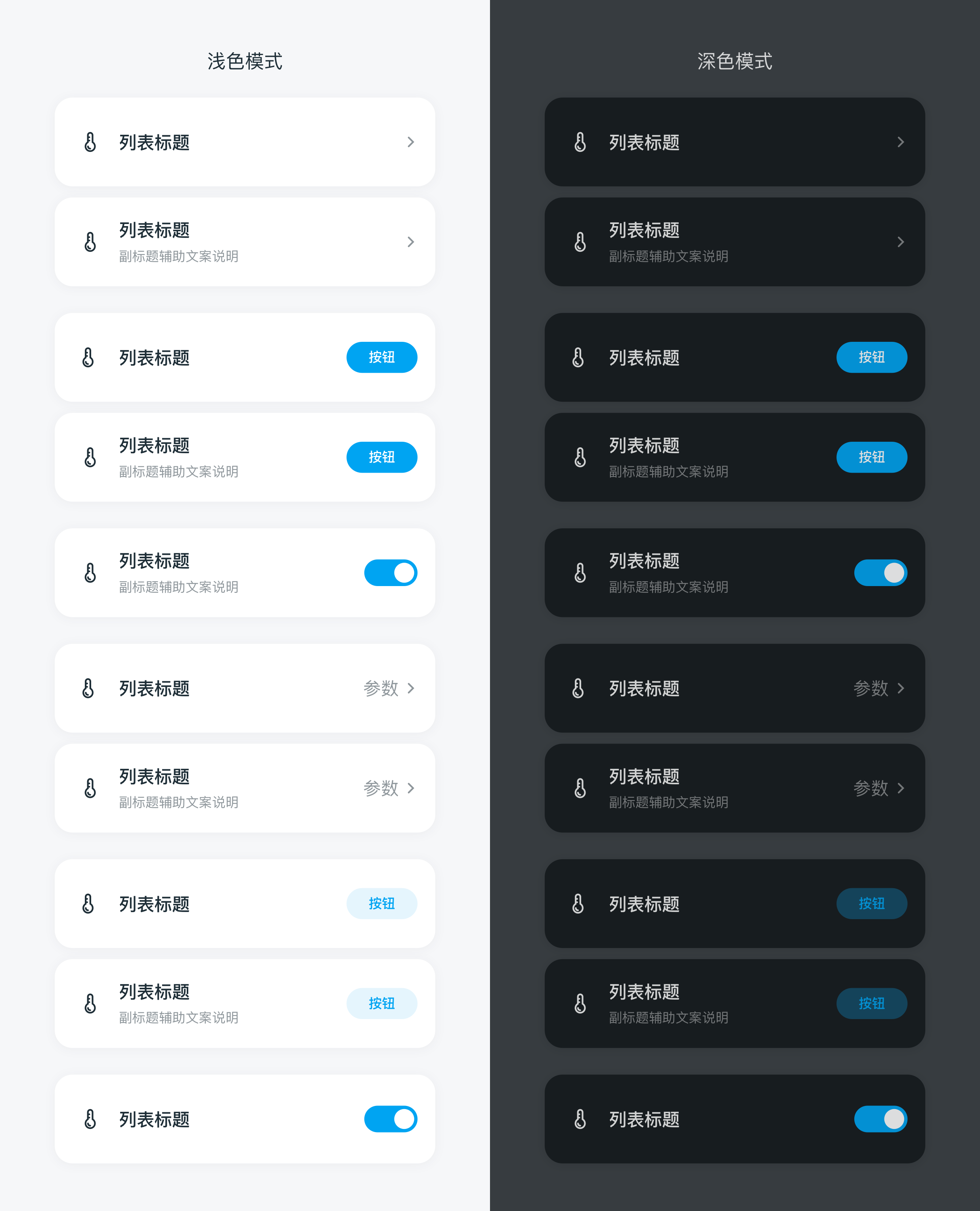
# 插件页首页
用于插件页首页,图标大小:32pt * 32pt
列表将组合成卡片形式展现
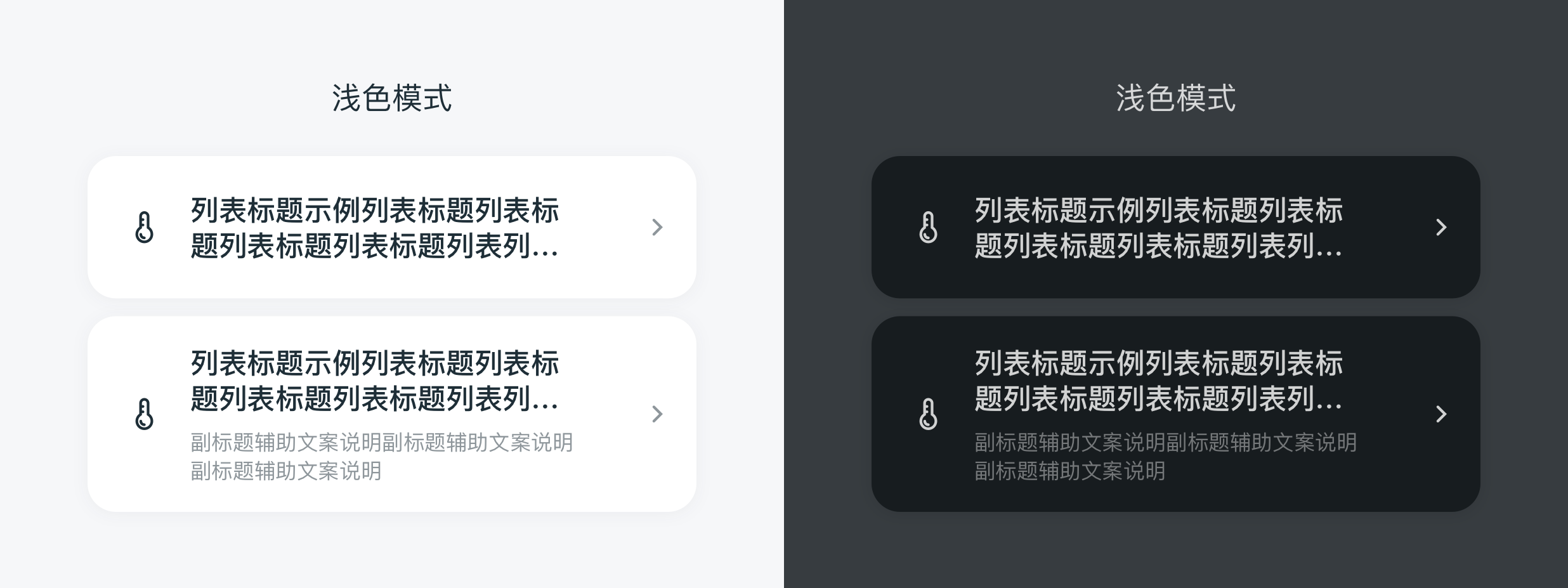
# 禁用状态
两种方法:
1、整行遮罩一层 70% 的白色
2、底色不变,元素和文字不透明度均为 30%
# 应用示例
# dof-cell2 单元格
单元格组件,可用作展示列表信息、图片或者描述文本等
# 规则
- 一般由标题、图片组成,图片在左、文本和操作在右
- 可以对
itemImg, switch进行slot覆盖 - 由于一些原因,cell组件暂时使用cell2替代(将使用到cell的地址替换为cell2即可),后续会整合为cell
# 实例
# 基础用法
<template>
  <div class="container">
    <scroller>
      <title title="dof-cell"></title>
      <category title="使用案例"></category>
      <text class="subtitle">窄列表 无图标</text>
      <dof-cell2 title="饮食禁忌"
        :has-margin="false"
        right-text="无"
        :clickActivied="true"
        @dofCellClicked="itemClicked">
      </dof-cell2>
      <dof-cell2 title="吸烟情况"
        right-text="不吸烟"
        :clickActivied="true"
        @dofCellClicked="itemClicked">
      </dof-cell2>
      <dof-cell2 title="饮酒情况"
        right-text="不饮酒或一周不少于 1 次"
        :clickActivied="true"
        @dofCellClicked="itemClicked">
      </dof-cell2>
      <dof-cell2 title="标题 无arrow 测试文本测试文本测试文本测试文本"
        :has-sub-bottom-border="false"
        :has-arrow="false"
        :has-margin="true"
        @dofCellClicked="itemClicked">
      </dof-cell2>

      <text class="subtitle">窄列表有图标,较多功能列表需要图标辅助说明</text>
      <dof-cell2 title="窄列表有图标,较多功能列表需要图标辅助说明"
        :has-arrow="true"
        :clickActivied="true"
        item-img="http://dolphin-weex-dev.msmartlife.cn/cdn/images/scene/ico_scene_04@3x.png"
        @dofCellClicked="itemClicked">
      </dof-cell2>
      <dof-cell2 title="窄列表有图标,较多功能列表需要图标辅助说明"
        :has-arrow="true"
        :has-sub-bottom-border="false"
        :clickActivied="true"
        item-img="http://dolphin-weex-dev.msmartlife.cn/cdn/images/scene/ico_scene_06@3x.png"
        @dofCellClicked="itemClicked">
      </dof-cell2>

      <text class="subtitle">宽列表无图标,常见用于预约界面等</text>
      <dof-cell2
        title="19 : 00    23 ℃ "
        desc="每天"
        size="medium"
        :has-arrow="false"
        :clickActivied="true"
        @dofCellClicked="itemClicked">
        <dof-switch class="switch-unit" :checked="switchValue" slot="switch" @dof-change.stop="handleSwitchChange"> </dof-switch>
      </dof-cell2>
      <dof-cell2
        title="标题+描述+switch"
        desc="周一  周二  周三  周四  周五  周六"
        size="medium"
        :has-arrow="false"
        :clickActivied="true"
        :has-sub-bottom-border="false"
        @dofCellClicked="itemClicked">
        <dof-switch class="switch-unit" :checked="switchValue" slot="switch" @dof-change.stop="handleSwitchChange"> </dof-switch>
      </dof-cell2>


      <text class="subtitle">宽列表有图标,用于美居场景辅助说明小图标</text>
      <dof-cell2 title="宽列表有图标,用于美居场景辅助说明小图标"
        :has-arrow="true"
        size="medium"
        :clickActivied="true"
        item-img="http://dolphin-weex-dev.msmartlife.cn/cdn/images/business/other/calorifier_icon_e+@3x.png"
        img-bg-color="#ffaa10"
        item-img-size="medium"
        @dofCellClicked="itemClicked">
      </dof-cell2>
      <dof-cell2 title="宽列表有图标,用于美居场景辅助说明小图标"
        :has-arrow="true"
        size="medium"
        :has-sub-bottom-border="false"
        :clickActivied="true"
        item-img="http://dolphin-weex-dev.msmartlife.cn/cdn/images/business/other/calorifier_icon_e+@3x.png"
        img-bg-color="#ffaa10"
        item-img-size="medium"
        @dofCellClicked="itemClicked">
      </dof-cell2>

      <text class="subtitle">宽列表有图标,用于需要大图标强调时</text>
      <dof-cell2  title="电风扇"
        tag="卧室"
        size="medium"
        item-img="http://dolphin-weex-dev.msmartlife.cn/cdn/images/smart/ico_smart_07@3x.png"
        item-img-size="max"
        @dofCellClicked="itemClicked">
      </dof-cell2>
      <dof-cell2
        size="medium"
        title="空气Ball"
        tag="卧室"
        desc="检测空气湿度,PM2.5到达一定数值"
        item-img="http://dolphin-weex-dev.msmartlife.cn/cdn/images/smart/ico_smart_11@3x.png"
        item-img-size="max"
        @dofCellClicked="itemClicked">
      </dof-cell2>
      <dof-cell2
        size="medium"
        title="空调"
        tag="卧室"
        desc="动开关机,调节到合适模式"
        right-text="设置"
        item-img="http://dolphin-weex-dev.msmartlife.cn/cdn/images/smart/ico_smart_01@3x.png"
        item-img-size="max"
        @dofCellClicked="itemClicked">
      </dof-cell2>
      <dof-cell2
        size="medium"
        title="空调"
        desc="动开关机,调节到合适模式"
        right-text="设置"
        item-img="http://dolphin-weex-dev.msmartlife.cn/cdn/images/smart/ico_smart_10@3x.png"
        item-img-size="max"
        img-bg-color="#EFEFEF"
        @dofCellClicked="itemClicked">
      </dof-cell2>
      <dof-cell2
        size="medium"
        title="更换滤芯提醒"
        right-tip="3分钟前"
        :has-arrow="false"
        :has-margin="true"
        desc="您的净水器滤芯已失效,点击查看"
        desc-color="#FF9500"
        :has-sub-bottom-border="false"
        item-img="http://dolphin-weex-dev.msmartlife.cn/cdn/images/smart/ico_smart_18@3x.png"
        item-img-size="max"
        @dofCellClicked="itemClicked">
      </dof-cell2>

      <text class="subtitle">特殊型 副标题有2行文字时</text>
      <dof-cell2
        size="max"
        title="更换滤芯提醒"
        right-tip="时间提示"
        :has-arrow="false"
        :has-margin="true"
        desc="摘要文字、摘要文字、摘要文字、摘要文字文字描述有转行情况、文字描述有转行情况"
        :has-sub-bottom-border="false"
        item-img="http://dolphin-weex-dev.msmartlife.cn/cdn/images/smart/ico_smart_18@3x.png"
        item-img-size="max"
        @dofCellClicked="itemClicked">
      </dof-cell2>
    </scroller>
  </div>
</template>


<style scoped>
  .container {
    background-color: #F9F9F9 ;
    position: relative;
  }
  .subtitle{
    font-size: 28px;
    margin-left: 32px;
    line-height: 60px;
    color: #666;
  }
  .switch-unit{
    margin-left: -200px;
  }
</style>

<script>
import { DofCell2, DofSwitch } from 'dolphin-intl-ui';
const modal = weex.requireModule('modal')

export default {
  components: { dofCell2, DofSwitch },
  data() {
    return {
      leftButton: '/assets/image/header/back_white@2x.png',
      switchValue:true,
    }
  },
  methods: {
    itemClicked() {
      modal.toast({
        message: 'current cell clicked'
      });
    },

    handleSwitchChange(e) {
      this.switchValue = !this.switchValue
    }
  }
};
</script>
2
3
4
5
6
7
8
9
10
11
12
13
14
15
16
17
18
19
20
21
22
23
24
25
26
27
28
29
30
31
32
33
34
35
36
37
38
39
40
41
42
43
44
45
46
47
48
49
50
51
52
53
54
55
56
57
58
59
60
61
62
63
64
65
66
67
68
69
70
71
72
73
74
75
76
77
78
79
80
81
82
83
84
85
86
87
88
89
90
91
92
93
94
95
96
97
98
99
100
101
102
103
104
105
106
107
108
109
110
111
112
113
114
115
116
117
118
119
120
121
122
123
124
125
126
127
128
129
130
131
132
133
134
135
136
137
138
139
140
141
142
143
144
145
146
147
148
149
150
151
152
153
154
155
156
157
158
159
160
161
162
163
164
165
166
167
168
169
170
171
172
173
174
175
176
177
178
179
180
181
182
183
184
185
186
187
188
189
190
191
192
193
194
195
196
197
# Attributes
| Prop | Type | Required | Default | Description |
|---|---|---|---|---|
| size | String | N | mini | cell列表的高度,分别为窄列表、宽列表、特殊列(两行desc)mini\medium\max |
| item-img | String | N | "" | cell左边图片 |
| item-img-size | String | N | mini | cell左边图片,可选项/mini/medium/max, 后两者用于宽列表 |
| img-bg-color | String | N | '' | 图片区域背景色,用于透明背景的图片可以加背景色 |
| title | String | N | "" | cell列表标题 |
| tag | String | N | '' | cell标题右侧的 tag 标签 |
| desc | String | N | "" | 展示说明信息 |
| desc-color | String | N | '' | 展示说明信息的字体颜色 |
| has-arrow | Bool | N | true | 是否显示箭头 |
| right-text | String | N | "" | 右侧"设置"文本文案 |
| place-holder | String | N | "" | 右侧"设置"文本placeholder文案,颜色较浅 |
| right-tip | String | N | "" | cell列表右侧上方的 tips |
| clickActivied | Boolean | N | true | cell列表点击是否显示背景色 |
| has-margin | Boolean | N | false | cell之间是否有margin,下方会显示一个外边距 |
| has-top-border | Boolean | N | false | 是否有上边框 |
| has-sub-top-border | Boolean | N | false | 是否有上内边框 |
| has-bottom-border | Boolean | N | false | 是否有下边框 |
| has-sub-bottom-border | Boolean | N | true | 是否有下内边框 |
| arrow-icon | String | N | - | 覆盖右向箭头 |
| cell-style | Object | N | {} | 自定义cell的样式 |
| disabled | Boolean | N | false | 是否禁用当前cell |
| right-width | Number | N | 0 | 列表滑动宽度 |
left-width | Number | N | 0 | 左侧区域宽度 |
left-background | String | N | #F56428 | 左侧滑动背景颜色 |
right-background | String | N | #F56428 | 右侧滑动背景颜色 |
isRTL | Boolean | N | false | 是否启用 RTL(从右到左)布局;默认关闭 ^2.5.6 |
needDarkMode | Boolean | N | false | 是否启用 M-dark/T-dark 内置暗黑适配 |
设置 :need-dark-mode="true" 可启用内置暗黑配色,主题初始化与构建配置见 接入说明。
颜色属性为空时使用内置配色;业务显式颜色和样式覆盖优先于默认配色,关闭暗黑适配后仍有效。
# Slot
<slot name="switch"></slot>:右边插槽,可以添加switch等组件<slot name="itemImg"></slot>:左边图片插槽<slot name="rightText"></slot>:右边图片插槽,rightTip、rightText、placeHolder的外层容器<slot name="right"></slot>: 滑动的文本插槽,使用时right-width为必传项,否则无效 见例1
# 例1
<text slot="right" style="color: #ffffff">删除</text>
# Events
| 事件名称 | 说明 | 回调参数 |
|---|---|---|
dofCellClicked | cell点击事件 | { e } |
dofCellSwipeClicked | 右侧滑动操作区点击事件 | { e } |